2026-10-16 • 5 min read • Build
No-Code MCP Solutions: A Live Server Without Writing One
A no-code MCP solution hosts a Model Context Protocol server for you. You add a documentation site, repository, or file, and your AI tools call the URL it gives you.
A no-code MCP solution hosts a Model Context Protocol (MCP) server for you. You add material you already have. You get a URL that Claude, Cursor, Codex, or VS Code can call, the same way those tools call a server someone wrote by hand.
You do not stand up a host, implement the protocol, or build the search. What remains are the decisions only you can make: which material the server may read, which tools the client may call, and who may use the URL.
What you add, and what you get back
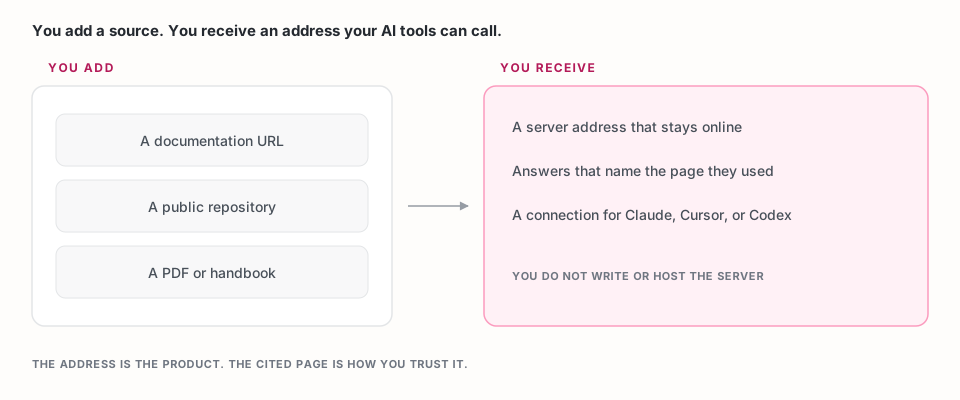
You add a source tied to one job. A documentation URL, a public website, a GitHub repository, a PDF, or an MCP endpoint another product already publishes. The upload section of a payments docs site is a better first source than the whole company domain, because you can tell whether the answers are right.
You receive an address. The server stays online. Indexing runs after you deploy, so wait until the source shows complete before you judge the answers. The address is what you paste into your AI client.
You receive answers that name a page. A no-code MCP solution is an AI context builder with the hosting included. The client asks a question, gets a short passage, and can open the page that passage came from.
The three decisions that stay yours
Which material the client may see. Start with one source. If you cannot name three questions that source already answers, the server is not ready to judge, no matter how quickly it deploys.
Which tools the client may call. Tools are the actions the client can take, such as searching the docs or looking up an API reference. Search and question answering cover most chats. Add API reference or code example lookup when the questions need an endpoint or a sample. The tool selection guide describes each one.
Who may call the URL. A public URL fits a help center. An internal runbook belongs on a private server that requires an access token. Who can reach your MCP server walks through that choice.
A no-code MCP solution is the path when those three decisions are the work you came to do.
How to tell it is working
Before you open the product, write the three questions. For a payments upload page they might be: which header authenticates an upload, what the maximum file size is, and which error comes back when a file is too large.
After the source finishes indexing, ask those questions in your AI client. Each reply should cite the page that contains the answer. Then ask one question the page does not answer. The reply should say the material does not cover it.
If the citation is missing, or it points at a page that does not contain the fact, the server is connected and the answer is still unchecked.
Limits worth knowing first
On MCP Studio, a new account starts on the free tier: 3 MCP servers, 2 sources on each server, and 50 MCP calls a month. The 50 calls are shared across the servers on the account, not counted again for each server. Another source beyond the two included is $3. Request plans and analytics tiers are separate, and the current figures are on the billing guide.
A website source can be large. Point the first server at the section you intend to test, then widen it once those three questions pass.
Build one
MCP Studio is a no-code MCP solution. The step-by-step is How to build an MCP server without coding: name the job, add one source, choose the tools, deploy, and run your three questions.
If you are building a product and want your own users to do this inside your app, that is SDK integration.
Frequently asked questions
What is a no-code MCP solution?
A no-code MCP solution hosts an MCP server for you. You add a documentation site, repository, website, file, or another product's MCP endpoint, choose the tools an AI client may call, and receive a URL. You do not write the server or run the host.
Do I still have to choose what the server can read?
Yes. The solution removes hosting, the protocol, and search. You still choose the source, the tools, and whether the URL is public or private. Those choices decide whether the answers are checkable.
How is this different from pasting docs into a chat?
A pasted passage stays at the version you pasted. A no-code MCP server reads the source you connected, and a refresh picks up the page you published. The client also gets a citation back to that page.
Can I keep an internal server private?
Yes. A private server answers only when the request carries its access token. Use that for runbooks and other material you would not put on a public URL.