2026-10-16 • 7 min read • Connect
SDK Integration: Embed an AI Context Builder in Your App
MCP Studio SDK integration puts an AI context builder inside your product, so your end users get a no-code MCP server without leaving your app.
SDK integration with the MCP Studio SDK puts an AI context builder inside your application. Your end users add their own documentation, deploy a no-code MCP server, and connect it to Claude, Cursor, or Codex. They do that in your product. They do not write a server, and they do not need an MCP Studio account of their own.
You keep the client secret on your backend. The page receives a short-lived token that proves the session is yours, plus a session token for the person who is signed in to your app.
What your user walks away with
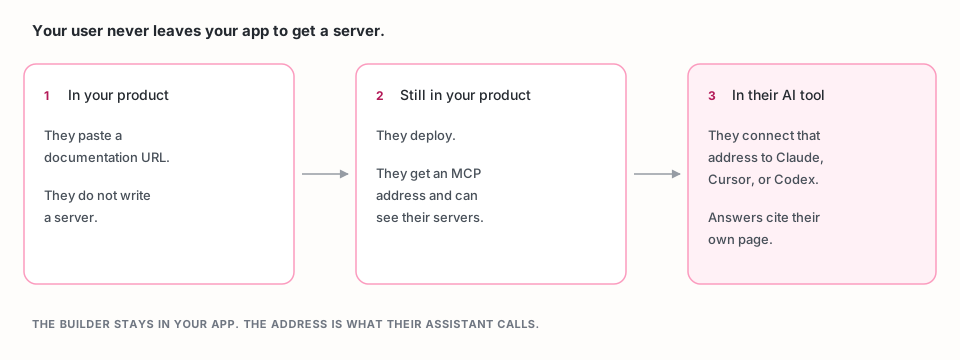
They get a no-code MCP solution. The embedded wizard is the same job as MCP Studio: add a source, choose tools, deploy. No-code MCP solutions are what you are handing them. AI context builders are what that server does on the next question: a few passages from their source, each one linked to the page it came from.
They deploy without leaving your app. A session token makes the last step create the server directly and show its address. The same token opens a dashboard of their servers, and an analytics view for the usage your plan includes.
They connect the address themselves. The address is on appatools.com.
They paste it into their AI client the way they would paste any other MCP
server URL.
Add the builder to a page
Sign in at the SDK portal. The portal gives you a client id and a client secret. The id ships in the page. The secret stays on your server.
The smallest embed is a container, the script, and MCPStudio.init. This
version is not finished until the two tokens from the next section are filled
in. A client id alone renders the wizard, and the servers people create are
not attributed to you: your plan does not apply, and they do not show up in
your usage.
<div id="mcp-studio-widget"></div>
<script src="https://appatools.com/mcp-studio-sdk/embed.js"></script>
<script>
  MCPStudio.init({
    clientId: "YOUR_CLIENT_ID",
    attributionToken: tokenFromYourBackend,
    sessionToken: sessionTokenFromYourBackend,
    container: "#mcp-studio-widget",
  });
</script>
React and Vue load the same script after the component mounts and pass the container element instead of a selector. Both are in the embed guide.
The widget needs a container at least 360px wide for the horizontal layout. A narrower sidebar can use the vertical layout, down to about 300px.
Mint the tokens on your backend
Call this from your server when the signed-in user opens the page. Send your
own id for that user as endUserId. It can be up to 200 characters, and it
must not start with ~.
curl -X POST https://appatools.com/mcp-studio-sdk/api/attribution/token \
  -H "Authorization: Bearer $MCP_STUDIO_CLIENT_SECRET" \
  -H "Content-Type: application/json" \
  -d '{"clientId":"'"$MCP_STUDIO_CLIENT_ID"'","endUserId":"user_1842"}'
The response field token is the attribution token. It lasts 15 minutes and
can be spent once, so mint it for the page view, not at signup. The field
sessionToken is present because you sent endUserId. It lasts 60 minutes
and can be reused in that window. Mint it only for the user the id names:
anyone holding it can see, change, and delete that user's servers until it
expires.
Pass token as attributionToken and sessionToken as sessionToken. The
endpoint refuses a request that carries an Origin header, which is how a
secret leaked into frontend code gets stopped.
To list and delete servers inside your app:
<div id="mcp-dashboard"></div>
<script>
  MCPStudio.dashboard({
    clientId: "YOUR_CLIENT_ID",
    sessionToken: sessionTokenFromYourBackend,
    container: "#mcp-dashboard",
  });
</script>
The full request, the Next.js example, and the analytics call are in Verify embed sessions and the end-user dashboard guide.
Check that the integration worked
- Open the page as a test user. The wizard should render in your container.
- Add one public documentation URL and deploy.
- Copy the server address the wizard shows. It should be an
appatools.comURL, and the server should appear onMCPStudio.dashboardfor that sameendUserId. - Connect the address in Claude, Cursor, or Codex. Ask a question the page already answers. The reply should cite that page.
- Ask a question the page does not answer. The reply should say so.
The playground runs the same wizard before you put it in your app. Sample apps for each piece of this flow are listed in the SDK docs.
Limits
The SDK is in beta. Two ceilings apply, and they are counted differently.
| Limit | Free | SDK Pro ($499/mo) |
|---|---|---|
| MCP servers | 1 per end user | 10 per end user |
| MCP requests | 1,000 / month, shared across every end user | 5,000 / month, shared the same way |
| Branding | Appa Tools name and logo | Your logo, or none |
There is no cap on how many end users you have. One person hitting the server count does not affect the others. The request allowance is the one that runs out for everyone at once, because every call on every server draws it down.
Each server includes 2 sources. A further source is $3. End users in the embed can add public websites, documentation, public repositories, API docs, and other MCP endpoints. Private GitHub repositories and file uploads are set up in MCP Studio with a direct sign-in, so they are not offered on a session token.
You choose which of those source types the wizard shows. The source guide and the plan limits are the references, and the price is on SDK pricing.
Frequently asked questions
What does SDK integration with MCP Studio SDK give my users?
It embeds an AI context builder in your app. Each end user adds a source and deploys a no-code MCP server without writing one, then connects the address to their own AI client. With a session token, deploy, the server list, and analytics stay inside your product.
Why is the client id in the snippet not enough?
The client id is in the page source, so anyone can copy it. Your backend mints an attribution token with the client secret. Without that token the wizard still renders, and the servers are not on your plan.
How long do the tokens last?
The attribution token lasts 15 minutes and works once. The session token lasts 60 minutes and can be reused until then. Mint both when the user opens the page, and only for that user.
Can an embedded user upload a file or connect a private repository?
No. Private GitHub repositories and file uploads need a direct MCP Studio sign-in. Embedded users add public websites, documentation, public repositories, API docs, and other MCP endpoints.