2026-10-16 • 5 min read • Build
AI Context Builders Put Your Own Material in Front of the Assistant
An AI context builder gathers your documentation, repository, or files and hands an assistant the few passages that match the question, each one linked to the page it came from.
An AI assistant answers from the material it can read when you ask. If that material is only what it already knows in general, you get a general answer. An AI context builder is how you swap in your own material: a documentation site, a repository, a handbook, or another product's MCP server.
The useful part is smaller than the connection. The builder picks the few passages that match the question and keeps the page attached, so you can open the source and see whether the reply followed it.
What the assistant is allowed to read
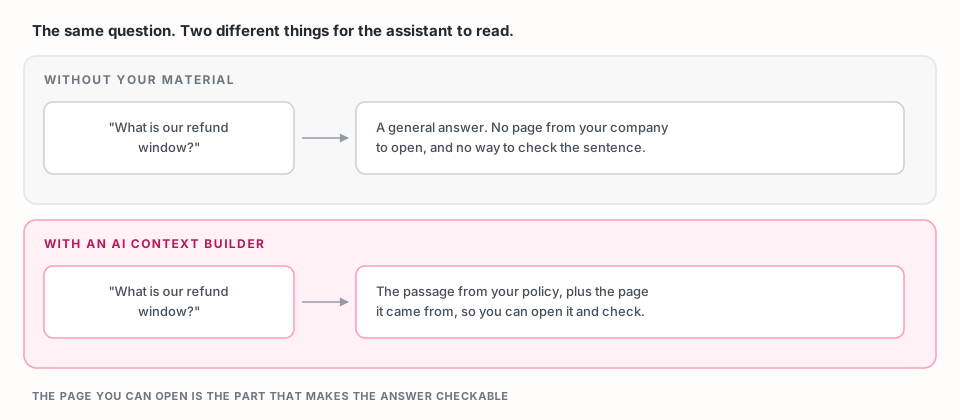
The builder chooses the passages. The assistant writes the reply. You pick the sources. On each question, the builder searches those sources and returns a short set of passages. The assistant is supposed to write from those passages, not from a neighboring topic that merely sounds related.
Every passage keeps the page it came from. That link is the difference between a fluent answer and one you can check. If the reply says the refund window is 14 days, you should be able to open the page and find 14 days.
A miss should say so. When your material does not cover the question, the useful result is a plain statement of that, plus the closest page, so you know what to add. A tidy answer built from a nearby but different page is the result to avoid.
What you give a builder
Give it one job, and the source that does that job.
A payments team might connect the upload section of their API docs. A support lead might connect the public help center. An engineer might connect the repository that implements the feature. One server per job stays easier to check than one server that holds everything the company has ever published.
AI context builders commonly accept:
- A documentation site or other public website
- A GitHub repository
- A PDF or another file you already share internally
- An MCP endpoint another product already publishes, so that product's current answers can sit beside your own pages
Start with the source that already answers the questions you care about. Add a second source when the first one is missing a page, not before you have seen the first one work.
What a grounded reply looks like
You: What header do we require on an upload?
Assistant: The upload page says the request must send an Authorization bearer token. That passage is from your payments API docs.
Two things make this useful. The fact is a fact your page states, and the page is named so someone else can open it. A reply with the same fact and no page is harder to trust, because you cannot see where it came from.
A check you can run on any builder
Write three questions your source already answers, in the words a person would actually type. People ask about "logging in." The docs may say "authentication." Ask the question the way the person would.
For each reply, confirm two things: the passage is from your source, and the cited page is the page that contains the answer.
Then ask one question your source does not answer. The reply should say so. It should not borrow a neighboring topic to fill the gap.
That test does not require a particular product. It tells you whether a builder is choosing context, or only connecting a URL.
Where MCP Studio fits
MCP Studio is an AI context builder. You add a source, choose the tools an assistant may call, and deploy a hosted MCP server. Claude, Cursor, Codex, and VS Code connect to the URL you receive.
The check above stands on its own. If you want the hosted path, open the wizard. How it works describes what the server returns, and no-code MCP solutions covers what you skip when you do not want to host the server yourself.
Frequently asked questions
What is an AI context builder?
An AI context builder gathers material you choose, such as documentation, a repository, or a file, and hands an assistant the passages that match a question. Each passage stays linked to the page it came from, so you can check the reply.
Do AI context builders write the answer?
No. The builder chooses the passages. The assistant writes the reply from those passages. If the passages are the wrong page, the reply will follow the wrong page, which is why the citation matters.
What should I connect first?
Connect the single source that already answers the questions you will ask. A section of a docs site is easier to judge than an entire company domain.
How do I know the answer used my material?
Open the citation. It should be a page you provided, and that page should contain the fact in the reply. If the reply cannot name a page, treat it as unchecked.