2026-09-22 • Updated 2026-09-26 • 7 min read • Connect
How to Give Claude Access to Your Documentation With MCP
Deploy your docs as a hosted MCP server in MCP Studio, add the URL to Claude as a custom connector, and check that answers cite your pages.
To give Claude access to your documentation, deploy the docs as a hosted MCP server and add its URL in Claude as a custom connector. In Context MCP Studio you paste your documentation URL, choose search tools, and deploy, with no code. In Claude, open Connectors, add a custom connector with the server URL, and turn it on in the chat. Claude then searches your docs and cites the page it used.
By the end of this guide, Claude will answer a question about your product from your own help center, and you will know how to confirm that the answer came from there rather than from general knowledge.
What a custom connector does
A custom connector is a named connection between Claude and a remote MCP server. You add it once, and in any new chat you open Connectors and turn it on. Claude asks the server, reads the passages that come back, and writes from those. You are not uploading the help center into every conversation.
The click-by-click version, with the same dialog screenshots, is Create a Claude custom connector. Anthropic's guide to custom connectors covers which Claude plans can add one. They work on the web, in Claude Desktop, and in Cowork, and a Free plan holds one custom connector.
Why connect the docs
A key rotation answer from the page that holds it. This guide follows one example. Your help center says API keys are rotated from Settings → Developers, and that webhooks keep working if the old and new keys overlap for 24 hours. That sentence is not general knowledge, and the connector is how Claude finds it.
The same help center in every chat. You add the connector once, so you never paste the docs URL into a prompt again.
You choose what Claude can see. Claude only sees what you put on that server. A second source, such as a handbook PDF, is not a second connector; add it on the same server when both belong to one job, as described in Create an MCP server from multiple sources.
How to build the docs server in MCP Studio
Claude reaches custom connectors from Anthropic's cloud, so the URL has to be on the public internet. MCP Studio hosts the server for you. Open the wizard; it takes about a minute and no code.
- Name it for the docs.
Payments help centertells you what the connector is for later. - Add the documentation URL. A section of the site is easier to judge than the whole company domain. A website source is indexed up to 5,000 pages.
- Choose search and question answering. Add API reference lookup when the docs include an endpoint reference. The tool selection guide covers each one.
- Deploy. Indexing starts in the background. Give a large site time to finish before you judge the answers.

Copy the server URL from the setup page:
https://appatools.com/mcp-studio/api/mcp/your-server-name
That is the address to paste into Claude; the wizard page and the dashboard will not accept the call. If the docs are confidential, make the server private and add the access token in the connector settings. Treat the token like a password, and read the private servers guide for how it works.
How to connect it in Claude
These steps match Claude on the web and Claude Desktop.
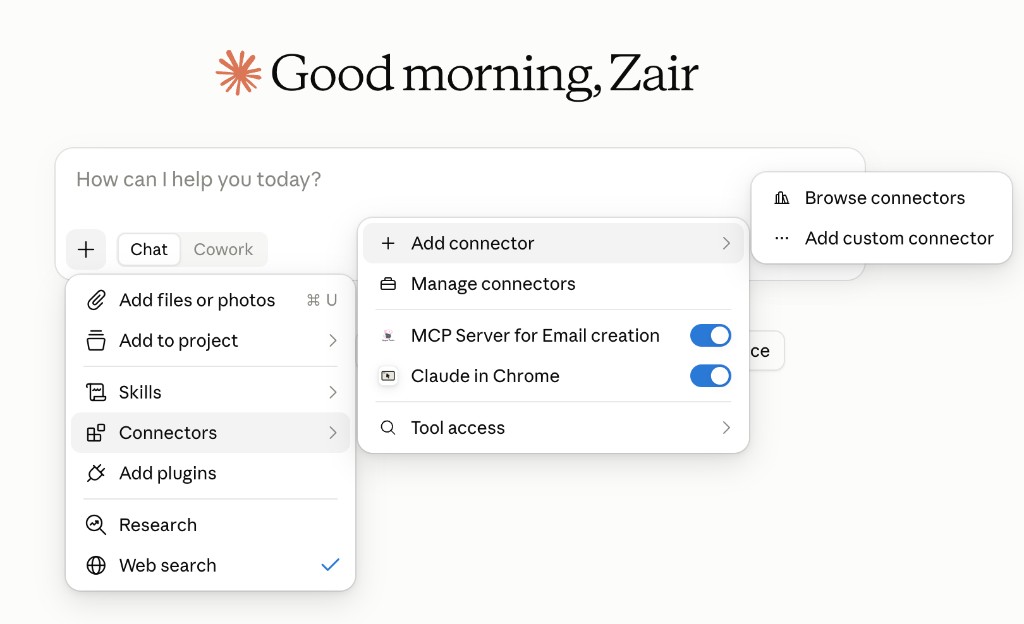
- Open Claude. Click the + button, then Connectors.
- Click Add connector, then Add custom connector.
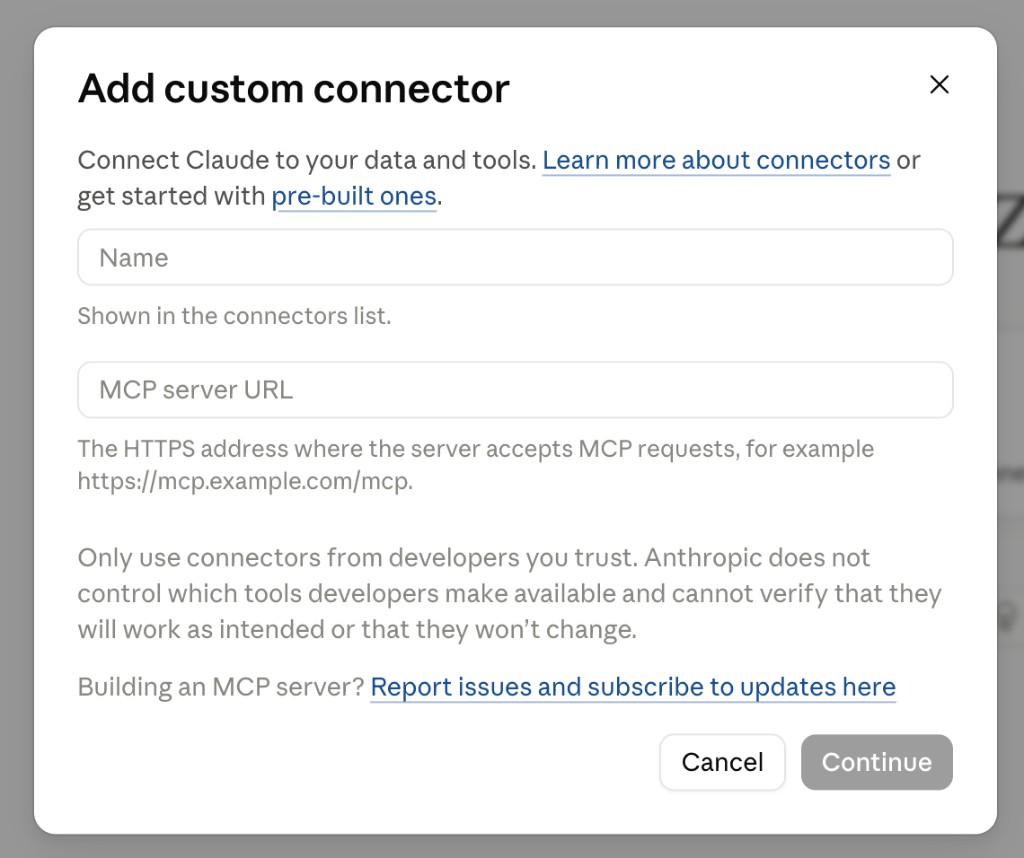
- Enter a Name you will recognize, and paste the MCP server URL.
- Click Continue.
- Back in the chat, open Connectors and turn this one on.
On a Team or Enterprise plan, an Owner adds the connector first, and everyone else clicks Connect on it afterward. The same server URL also works in other clients such as Cursor and Codex.
How to check that it works
Ask a question you know the answer to. Ask how to rotate a key without dropping webhooks. The reply should mention the 24 hour overlap and cite Settings → Developers. Open the citation and read around it.
Look for connector activity. Most chats show a tool call beside the reply. A connector can exist on your account and still be off for the conversation you are in, so if there is no activity, check that toggle first.
Ask something the help center does not document.
You: What is our incident escalation policy?
Assistant: Nothing in this server's content covers incident escalation. The closest material is the key rotation guide, which is a different subject. You would need to add that document as a source.
That answer shows the connector is in the path.
If the reply is not what you expected
Change one thing, then ask the same question again. Confirm the toggle is on for this chat, confirm indexing has finished on the dashboard, and rephrase the question in the wording the help center uses. If Claude does not list the connector at all, work through Fix an MCP server that isn't showing up in Claude.
Frequently asked questions
Can I give Claude access to my documentation without writing code?
Yes. MCP Studio turns a documentation URL into a hosted MCP server from a wizard, with no code. You then paste the server URL into Claude as a custom connector and turn it on in the chat.
Which Claude plans can add a custom connector?
Custom connectors are available on Claude Free, Pro, Max, Team, and Enterprise plans, on the web, in Claude Desktop, and in Cowork. A Free plan can hold one custom connector. On Team and Enterprise, an Owner adds the connector before other members can connect it.
Why is Claude not using my documentation?
The most common cause is that the connector is off for the current chat, since connectors are turned on per conversation. The next is that indexing has not finished yet on the MCP Studio dashboard. Rephrasing the question in the words your docs use also helps Claude find the right page.
Can I connect private documentation to Claude?
Yes. Make the MCP Studio server private, which means every request needs an access token, and add that token in Claude's connector settings. Treat the token like a password and only share it with people who should read the docs.
How does Claude get updates when my docs change?
Claude reads from the server each time it asks a question, so it sees whatever the server has indexed. When your docs change, click Refresh on the source in MCP Studio to re-index it. Unchanged pages are detected and skipped, so a refresh is quicker than the first crawl.
Connect your docs to Claude with MCP Studio
Open MCP Studio, deploy your documentation from its URL, and paste the server URL into Claude as a custom connector. The wizard takes about a minute with no code, and one question you already know the answer to shows whether the citation is right. Start building.