2026-09-22 • Updated 2026-09-26 • 6 min read • Fix
How to Fix an MCP Server That Isn't Showing Up in Claude
Fix a Claude connector that isn't showing up: turn it on for the chat, check the /api/mcp/ URL, and know the Owner and Free plan rules.
When an MCP server is not showing up in Claude, the usual cause is that the
custom connector exists on your account but is switched off in the current
chat. Open Connectors from the + button and turn it on for this
conversation. If it is missing from the list entirely, add it again with the
URL containing /api/mcp/ from your Context MCP Studio setup page, not the wizard or
dashboard address.
By the end you will know whether the connector is missing or merely off, and you will have a quick test that proves Claude is calling your server.
What "showing up" means in Claude
The connector's name is in the list, and the toggle is on for this chat. When Claude uses it, you see connector activity beside the reply. No activity means Claude wrote the answer from general knowledge without calling your server.
That is why this problem takes a minute to notice. Claude answers whether or not your server is in the conversation, so a missing connector looks like a normal reply.
Throughout this post, the example is a refund handbook server. The test question is "What do we refund if a customer cancels eight days out?", which Claude cannot answer well without the handbook.
Why the connector is usually hidden
It exists on the account and is off in this chat. You added it last week, and this conversation never turned it on. Connectors are enabled per chat, so every new conversation needs the toggle.
The saved URL is the wizard or the dashboard. Claude will save either one,
and neither will connect. The field needs the URL that contains /api/mcp/
and the server name.
On Team and Enterprise, an Owner adds it first. If you cannot see Add custom connector, that is the reason. After an Owner adds it, everyone else clicks Connect on it.
A Free plan holds one custom connector. If you already have one, Claude will not take a second. Remove the other one or move to a different Claude plan. That limit is Claude's, set in Anthropic's custom connector guide.
How to add the connector with the right URL
MCP Studio is the no-code builder on Appa Tools. Open the server's setup page and copy the URL. If you still need a server, build it in the wizard. The docs version of this setup is Give Claude access to your documentation.
- Open Claude. Click +, then Connectors.
- If the name is missing, click Add connector, then Add custom connector.
- Enter a name, such as
Refund handbook, and paste the MCP Studio URL into MCP server URL.
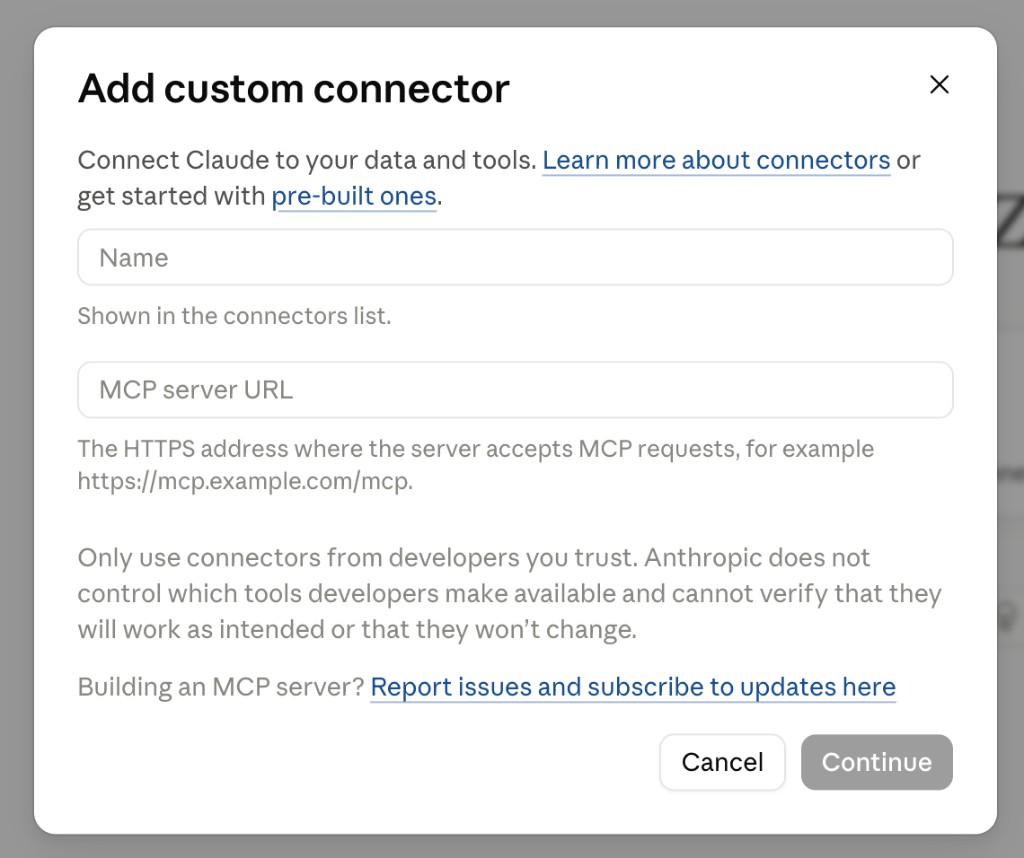
- Back in the chat, open Connectors and turn this one on.
- For a private server, add the access token in the connector settings. A curl call with the bearer token tells you whether the token is the problem before you keep clicking. The header format is in the private servers guide.
The full dialog, with screenshots of every step, is in Create a Claude custom connector.
Claude Desktop also accepts a local command instead of a connector. That
mcp-remote JSON is in the private servers guide. It is a separate setup from
the connector list, so a server configured that way will not appear under
Connectors.
Check that it works
Ask the refund question in a chat with the toggle on. Look for connector activity beside the reply, then open the citation. It should point to the page in your handbook that holds the refund table.
The connector can appear before indexing finishes. The endpoint exists as soon as you deploy, so Claude can list it right away. Wait for the source to show as complete on the dashboard before you judge the answers.
What to do if it is still missing
Change one thing at a time. Before you delete the connector and add it again, confirm the URL answers with curl, as described in Fix an MCP server that isn't connecting. If curl lists tools, the server is fine and the problem is in Claude's settings.
If the connector is on and the answer is still wrong, the connection is proven and the next step is the content. Follow the order in Debug an MCP server.
Frequently asked questions
Why is my MCP server not showing up in Claude?
Most often the custom connector exists on your account but is turned off in the current chat. Open Connectors from the + button and switch it on. If it is not in the list at all, add it as a custom connector using the MCP server URL from your setup page.
How do I turn on a connector in a Claude chat?
Click the + button in the chat, choose Connectors, and flip the toggle next to the connector's name. Connectors are enabled per conversation, so you turn it on again in each new chat. Connector activity beside a reply confirms Claude called it.
Why can't I see Add custom connector in Claude?
On Team and Enterprise plans, an Owner has to add a custom connector before anyone else can use it. Once the Owner adds it, other members click Connect on it. If you are on one of those plans and the option is missing, ask your Owner.
How many custom connectors can I add on Claude's Free plan?
A Free Claude plan holds one custom connector. To add another, remove the existing one or move to a different Claude plan. This limit comes from Claude, not from the MCP server.
How do I add a private MCP server to Claude?
Add the connector with the server's URL, then enter the access token in the connector settings. The token for an MCP Studio server starts with mcps_live_ and works for that one server only. Treat it like a password.
Connect your server to Claude with MCP Studio
Open MCP Studio, copy the
/api/mcp/ URL from your server's setup page, and paste it into Claude as a
custom connector. Turn the toggle on for the chat and ask one question you can
check. Connector activity beside the reply means your server is in the
conversation.