2026-08-29 • 7 min read • Build
Ship a Docs MCP Built Around One Real Task
Design a documentation MCP server around a single task a developer is trying to finish: choosing sources by the role they play, writing sections that read well on their own, exposing a small tool set, and testing against answers you wrote down first.
A documentation MCP server lets an AI client search and retrieve your documentation through MCP tools. What decides whether one is useful is not how much content you connect to it. It is whether you designed it around a single task somebody is actually trying to finish.
This post walks through that build using one example task throughout: moving an integration from API version 1 to API version 2 without changing application behavior. You will choose sources by the role they play, write sections that read well on their own, expose a small tool set, and test against answers you wrote down first. The result is a server a developer can connect to their AI client and finish the migration with.
Start with the task, not the source count
Write the task down in one sentence, the way the person doing it would. Ours is this:
Move an integration from API version 1 to API version 2 without changing application behavior.
That sentence is already a specification. Someone finishing it needs the migration steps in order, the fields that changed and what they changed to, a working implementation to copy, the release caveats that apply to their setup, and the runtime version the new API requires. Five kinds of evidence, and now you know what your first version has to hold.
Everything else waits. A server built around one task is one you can judge: you can tell whether a developer completed the migration or stopped halfway. Broaden coverage once that task works reliably.
Choose each source for the job it does
Add each source because it carries a part of the task that nothing else carries.
| Source | What it contributes to the migration |
|---|---|
| Guides | The ordered procedure, its prerequisites, and why each step exists |
| API reference | Exact endpoint names, parameters, accepted values, response shapes, errors |
| Sample repositories | A complete working implementation in a language your team uses |
| Changelog | Release dates, renamed settings, compatibility notes, current behavior |
| PDFs | Specifications and reports that were never published as pages |
| Other MCP servers | Retrieval context from a system that already exposes it |
One boundary on that last row. MCP source federation supports retrieval. It does not expose a remote server's action tools through your server, so it contributes context and nothing more.
Name the test question each source is there to answer. If you cannot name one, the source is not part of this build.
Write sections that survive being read alone
A retrieved passage arrives without the page around it. The client sees a heading, a paragraph or two and a code sample, and that has to be enough.
Put the subject in the heading. A section called Configuration says
nothing once it is separated from the page it sat on. Configure webhook signature verification identifies itself wherever it lands, and it matches the
words a developer would use to ask for it.
Keep every constraint beside the thing it constrains. The supported version, the prerequisite, the warning about the step that cannot be reversed. All of it travels with the procedure rather than sitting in an introduction three screens up.
Make each example complete. Imports, setup and expected output, with commands, flags and parameter names written exactly as they are. Then read it back and ask whether it answers the question with nothing in front of it.
Specific headings and self contained sections help page scanning and site search too, so this work complements the workflow you already run.
Expose a small tool set
Tool names and descriptions are how an AI client picks a retrieval path, so keep the list short and the purposes distinct. Four cover the migration:
search_docsfor broad discoveryask_questionfor natural language questions across every sourcefind_api_referencefor endpoints, methods, parameters and exact valuesget_changelogfor release and version questions
Add a tool only when it represents a genuinely different intent. A small set is easier to describe and test, and the split across tools later tells you whether developers are working through procedures, checking reference details, or chasing releases.
Build and connect the server
Configure the server in Context MCP Studio:
- Name the server for the product or use case.
- Add the documentation URL for the target task.
- Add a reference, changelog, repository, PDF or MCP source only when it contributes required evidence.
- Select the retrieval tools that match your test questions.
- Deploy the server.
- Connect it to an AI client.
MCP Studio indexes up to 5,000 pages per source. On a large site, start from a URL inside the relevant product area so the indexed pages are the ones the task needs.

Publish a connection page once the server passes its tests. State what it contains, list its tools, and give the configuration for the clients your developers use:
{
  "mcpServers": {
    "acme-docs": {
      "url": "https://appatools.com/mcp-studio/api/mcp/acme-docs-h8w2v5"
    }
  }
}
Include example prompts:
- "Using the Acme docs, show me how to verify a webhook signature in Node.js."
- "Find the current environment variable for changing the local port."
- "Check the changelog for changes to the authentication flow."
Test with questions you already know the answers to
A successful connection proves transport and configuration. It says nothing about whether the answers are right, and the answers are what you ship.
Write the expected answer and the supporting page before you run the test. Five to ten questions is enough, drawn from onboarding, support conversations, recent releases and the work the task involves. Deciding the right answer first makes this a measurement rather than an impression.
Cover these five shapes:
- A procedural question
- An exact parameter or environment variable lookup
- A task that needs both a guide and the API reference
- A version specific question
- A question your current content does not answer
Read the retrieved passage, not only the generated answer. Check the exact technical strings, the current behavior and the prerequisites. A passage can be about the right subject and still omit the detail that finishes the job.
For repeatable scoring, use the MCP Server Accuracy Rubric, which separates factual accuracy, specificity, completeness, currency and source groundability.
The part worth committing to: keeping the question you cannot answer
That fifth question is the one to take seriously. It is in the set so you can see what happens when the answer is genuinely not there, and it stays for good.
A clear gap is worth more than a plausible answer. When the reply says nothing in the content covers the question, a developer spends thirty seconds on it and looks elsewhere. When it says something confident built out of the nearest related paragraph, they spend an afternoon on it and trust the next answer less. So test for the gap deliberately, and treat a clear refusal as a pass.
It also gives you the most concrete backlog item you will get: a question somebody asked that your material does not cover. Write the page, run the same question again, and watch it come back answered.
Review what people actually ask
MCP request evidence adds question and retrieval data to page views, site search, feedback and support conversations. What the MCP Studio dashboard shows depends on your analytics tier: request totals, tools used, sources referenced, query text, retrieved passages, confidence and content gaps.
Run a weekly review:
- Group recurring questions by task.
- Inspect requests that returned no useful passage.
- Review lower confidence results on important workflows.
- Compare the wording people use against your headings and terminology.
- Make one focused content change.
- Run the same test questions again.
Choose the smallest edit the evidence supports. Add the missing prerequisite, rename the ambiguous heading, complete the half written example, or create a page for a topic with no coverage. One change per review, checked against the same questions, tells you what helped.
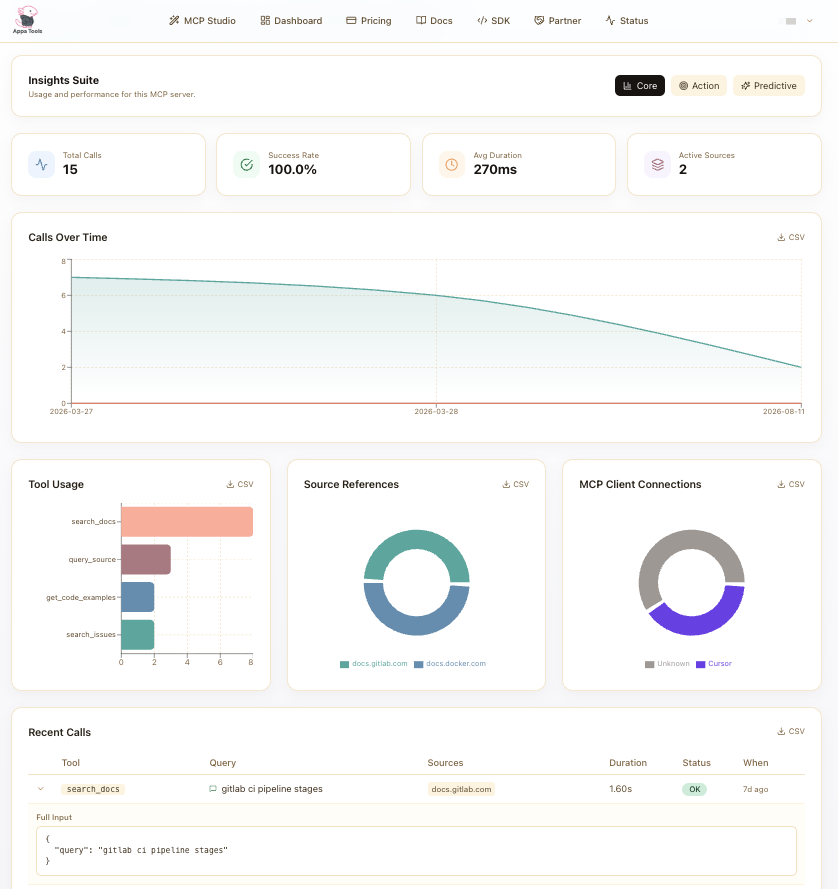
The free tier is enough for a first server. Build it around one task, validate it, publish the connection instructions, and expand from what people actually ask it for.
Keep going
- MCP for technical writers, a focused introduction for documentation teams
- Tutorial: a docs MCP for writers, a step by step setup
- How to know if your docs MCP is accurate, a five dimension evaluation method
- The metrics that matter for a docs MCP, a guide to continuous measurement
- What is a docs MCP server?, the conceptual background
- Monitor quality and impact in the dashboard, an explanation of each dashboard area