2026-09-03 • 6 min read • Build
Your GitBook Docs and Your Code Behind One MCP Endpoint
Every published GitBook site includes its own MCP endpoint. Here is how to put that endpoint and a code repository behind one MCP Studio server, and how to check that both of them are answering.
Someone on your team asks their assistant: how do I initialize the client in Vue and handle a paginated response?
Half of that answer is in your published documentation, which carries the current initialization steps and the shape of a paginated response. The other half is in a repository: the imports, the component structure, and the request code somebody already got working. Sometimes there is a third piece, a specification in a PDF.
Each holds exactly what it should. What is missing is one place to ask.
This post builds that place: one MCP endpoint reaching your GitBook MCP server and your repository in the same answer, and reporting on which of them people use.
What each source brings
Your GitBook site publishes an MCP endpoint, and it is current by definition. Every published GitBook site automatically includes an MCP server giving read-only access to the latest published version of your content. MCP Studio connects to it live, asking GitBook when a question arrives and including what comes back. Your pages are not copied into an index, so a publish shows up in the next answer.
A repository is read once and kept searchable. Context MCP Studio reads the files, splits them into passages, and matches those on meaning as well as on wording, so "show me where pagination is handled" finds the right function even when the word pagination appears nowhere in it.
| Source | How it answers | When it changes |
|---|---|---|
| Your GitBook MCP endpoint | Asked live, on every request | As soon as you publish |
| A public GitHub repository | Answered from MCP Studio's own index | After indexing, and on each refresh |
A live source needs the remote endpoint to answer in time, and an indexed source needs indexing to have finished.
Find your GitBook MCP endpoint
Your endpoint is your published site URL with /~gitbook/mcp on the end, so
documentation at https://acme.com/docs has its MCP server at
https://acme.com/docs/~gitbook/mcp.
Check one setting in GitBook first. Page actions has to be on, under Site
customization, because that setting is what keeps ~gitbook/mcp live; with it
off, the endpoint returns a 404. The separate Connect with MCP server option only
adds a copyable MCP link to the page actions menu for readers.
Opening the endpoint in a browser shows an error rather than a page, which is expected. The wizard's source check is the real test: it asks the endpoint which tools it offers.
This guide covers publicly readable published content, which is what a GitBook
MCP endpoint serves by default. An authenticated site's endpoint asks the caller
to sign in the same way the site does, and a partly authenticated site, with some
content still public, has a second endpoint ending in /~gitbook/mcp/auth. For a
combined server, point the wizard at a publicly published site, and add anything
behind the login as a file source instead.
Build the combined server
The free tier includes two sources per server, which is one GitBook endpoint and one repository. New accounts get three more on their first server.
- Open the MCP Studio wizard.
- Name the server for the product it covers, such as
acme-context. - Add
https://acme.com/docs/~gitbook/mcpas the first source. - When the wizard asks whether the server needs authentication, choose No, it's public.
- Let the source check run. It reports how many tools the endpoint offers and how many can be answered from a plain question.
- Add a public GitHub repository URL as the second source.
- Turn on
search_docs,ask_question, andget_code_examples, plusfind_api_referenceif your documentation has API reference material. - Deploy, then give the repository index time to finish.

Then add the one endpoint to your MCP client:
{
  "mcpServers": {
    "acme-context": {
      "url": "https://appatools.com/mcp-studio/api/mcp/acme-context-h8w2v5"
    }
  }
}
That single entry covers both sources. Your readers keep connecting straight to your GitBook endpoint as they do today; this server is what your team points at when a question spans documentation and code.
Test both paths before you share the endpoint
Use questions whose answers you already know, and check each path on its own first. Documentation path: which parameters are required for pagination. Repository path: find the code that handles paginated responses. Both at once: explain the recommended pagination workflow and show where the Vue sample implements it.
Read the citations, not just the answer. A combined reply should keep published guidance and repository code distinguishable, and content relayed from a connected endpoint is labeled, so you can see which source answered.
What a connected MCP endpoint does, and what it does not
A connected MCP endpoint provides retrieval only. MCP Studio asks it for content and includes the text it returns. It does not expose that remote server's action tools through your server, so nothing on your endpoint can send a message, open a pull request, or change data. Only read tools are called, and a tool whose job is to send, create, publish, or submit is never chosen.
A connected source contributes a bounded share of each answer, because the reply also carries your indexed passages. Focused questions get more out of that room than broad ones.
Not every MCP server can be driven by a general question. A server requiring an identifier on every tool has nothing to fill it with when the input is a sentence. The source check counts queryable tools separately, so the wizard tells you before deploying.
A private repository sets the server private, and an uploaded file starts it
private. Clients then need an access token scoped to that one server, starting
mcps_live_.
See which sources are earning their place
Every request is recorded, whichever source answered it.
Request counts, calls over time, and breakdowns by tool and by source are included for everyone, enough to see whether your GitBook endpoint takes part in answers and whether the repository contributes to the questions you added it for.
The Action tier adds the detail behind each request: the exact passage returned, how confident the match was, and where content is missing. Turning a tier on shows you history you already have, and new accounts get a 30 day trial with all analytics.
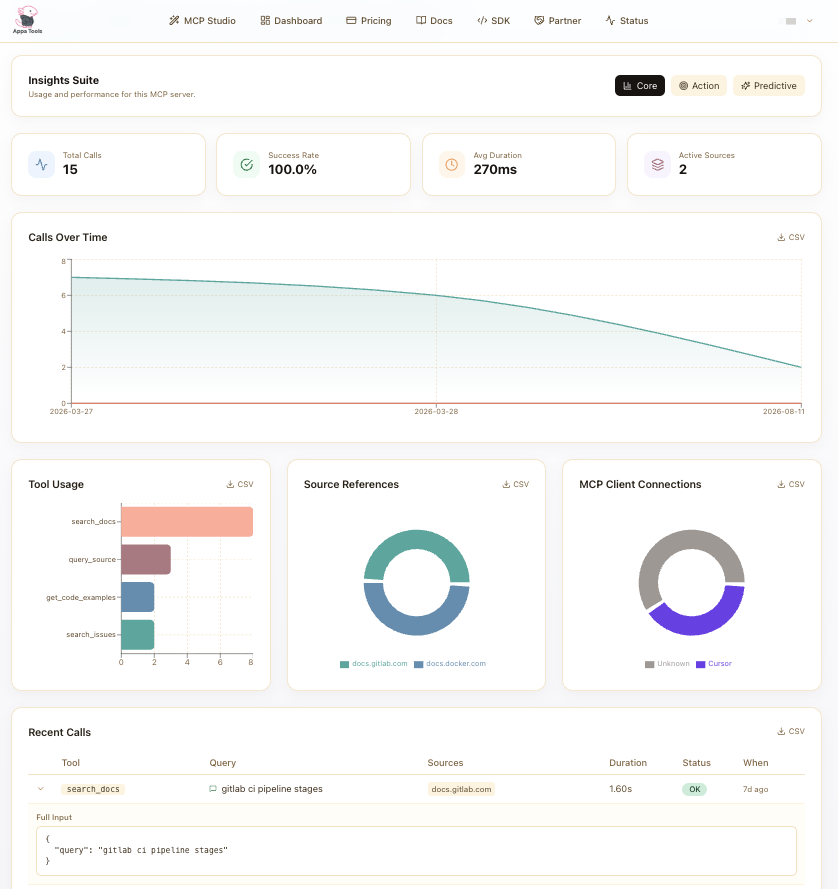
What the dashboard cannot tell you is whether an answer was right, so keep your known questions and run them again after changing a source.
The part worth committing to: saying when neither source has it
What a combined server does with the questions neither source covers is worth deciding on purpose.
When neither the documentation nor the repository genuinely matches the question, the reply says so before anything else, and your assistant is told to pass that on rather than assemble something out of whatever was closest.
You: What is the retry policy for webhook deliveries?
Assistant: Nothing on this server covers webhook retries. The closest material is the pagination guidance in the documentation, which is a different subject. You would need to add that documentation or a sample as a source.
That is the commitment, and it holds however many sources you connect. An answer that names its own gap tells you exactly what to add next.
What this means if GitBook already works for you
Keep it as it is. Your published documentation stays in GitBook, your readers keep the endpoint you already give them, and nothing about how you write or publish changes.
What you gain is coverage of the material that was never going to be published: the implementation in a repository, the specification in a PDF, the numbers in a spreadsheet. One endpoint reaches all of it.
Point the wizard at your /~gitbook/mcp URL and a repository, deploy, and ask
something that needs both.
Read more in MCP server sources, adding sources, and the dashboard guide.