2026-08-29 • 6 min read • Build
How to Build a Full-Stack App From an Architecture Diagram
Draw the application as a mermaid diagram, add the docs, demo repos, and SDK references for every box, put them on one MCP server, then ask your editor to write the first pass.
The first thing you build is not the app. It is a picture of the app.
A mermaid diagram of the architecture names every tool the first pass will touch. Each box already has a documentation site, often a public demo repository, and usually an API reference or a generated SDK. Those pages are what decide whether the first generated file uses a parameter that exists.
This post draws one application, turns every box into sources, puts them on one MCP server, and only then asks an editor to write the first pass.
Draw the application you are about to build
Here is a checkout application that stores a PayPal customer ID on the user record and uses it when creating an order. One sentence of work, spread across the stack.
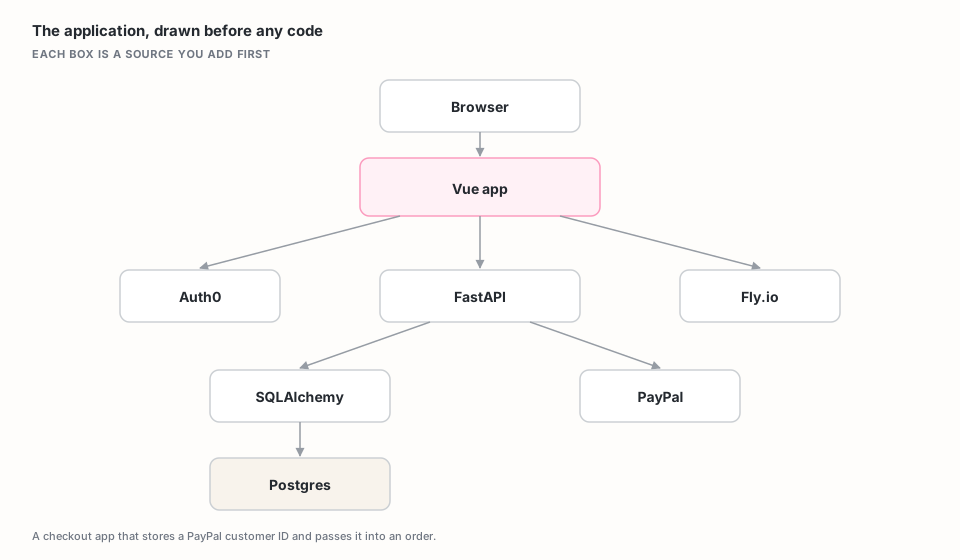
The mermaid for that picture, so you can copy it and change the boxes:
flowchart TB
  Browser[Browser] --> VueApp[Vue app]
  VueApp --> Auth[Auth0]
  VueApp --> Api[FastAPI]
  VueApp --> Host[Fly.io]
  Api --> Orm[SQLAlchemy]
  Orm --> Postgres[(Postgres)]
  Api --> PayPal[PayPal]
If a box is on the diagram, its context goes on the server before anyone writes a line. The diagram is the source list. A box with no source is a part the editor will have to invent. Boxes that are not in the first feature wait until you need them.
Turn each box into sources
For each box, collect up to three addresses: the current docs, a public demo or examples repo, and the API reference or generated SDK for the client you will call.
| Box | Docs site | Demo or examples repo | API or SDK docs |
|---|---|---|---|
| Vue app | vuejs.org/guide | vuejs/docs | The composition-API and component pages in the same docs tree |
| Auth0 | auth0.com/docs | auth0-python-web-app | The SDK pages for the sign-in methods you will use |
| FastAPI | fastapi.tiangolo.com | full-stack-fastapi-template | The path-operation and dependency pages in the same docs tree |
| SQLAlchemy | docs.sqlalchemy.org | sqlalchemy/sqlalchemy | The current ORM mapping and query reference |
| PayPal | Checkout guide | paypal-examples | PayPal REST API |
| Fly.io | fly.io/docs | Environment variable and machine pages for the host you picked | |
| Postgres | The docs for the host you use | Connection and URL format for that host |
Point at a section, not at a whole domain. Each website source is indexed up
to 5,000 pages. https://docs.sqlalchemy.org is the right kind of URL. The
marketing homepage is not.
A demo repository is often more useful than the library source. Official examples show the shape of a working app. You want that when the task is writing the app.
Generated SDK docs belong next to the human guide. The Checkout guide explains when to pass an existing customer. The REST API names the field. The first pass needs both.
The free tier includes two sources per server. Extra sources are $3 each. This walkthrough uses more than two, so plan for that, or start with the two boxes the first prompt depends on and add the rest from the dashboard.
If a vendor already publishes an MCP endpoint for its docs, you can add that URL instead of crawling the site. A connected MCP endpoint provides retrieval only. It does not expose that remote server's action tools through yours. See Connect another MCP server.
One server for the whole diagram
Use one server when a single question needs several boxes at once. The first-pass prompt is exactly that: a FastAPI route, a SQLAlchemy field, and a PayPal parameter, in one answer.
Split across servers when access requirements differ. Public documentation
can stay on a public endpoint. Adding a private GitHub source sets the server to
private, and every client then needs a server access token that begins with
mcps_live_. Read the
private MCP servers guide
before connecting a private repository.
For this walkthrough the sources are public, so the server can stay public. After the first pass exists, you can add your own repository as a later source.
Create the server
Open the MCP Studio wizard and name
the server after the application, such as acme-shop-stack. Add each URL
from the table, using the deepest stable URL that still covers the feature.
Choose the tools the editor will call:
get_code_examplesretrieves implementation examples.find_api_referencesearches for endpoints, methods, and parameters.extract_schemaretrieves schema definitions.search_docshandles general documentation retrieval.search_issuessearches connected issue content.
Deploy once the sources and tools are set.

Indexing continues in the background, so you can close the browser. Let the sources finish before you judge what the server retrieves.
Connect your editor
Copy the generated endpoint into your MCP client configuration. A Cursor project
keeps it in .cursor/mcp.json:
{
  "mcpServers": {
    "acme-shop-stack": {
      "url": "https://appatools.com/mcp-studio/api/mcp/acme-shop-stack-k3m9x2"
    }
  }
}
For a private server, add the access token using the authenticated configuration Context MCP Studio shows you, and keep it out of version control. Tokens are shown once and can be revoked individually.
The endpoint configuration can be shared through version control. The token stays with each developer. Claude Desktop, VS Code, Windsurf, and other clients store their settings elsewhere, and the connection guide has the exact location for each.
Ask for the first pass of the whole diagram
Check each box on its own first:
- Ask
find_api_referencewhich PayPal order parameter accepts an existing customer. - Ask
extract_schemahow the current SQLAlchemy docs define a nullable column on a user model. - Ask
search_docshow the installed FastAPI version shapes a path operation. - Ask
get_code_examplesfor a sample that creates a PayPal order from a server route.
Then ask the question the server exists for. Paste the mermaid into the prompt:
Here is the architecture I am building: [paste mermaid]. Using every connected source, outline and then write the first pass: a Vue app with Auth0, FastAPI, SQLAlchemy, and PayPal Checkout that stores a PayPal customer ID on the user and passes it when creating an order. Cite the source for each decision. If a box is not covered, say so before writing that part.
A good first pass names parameters that exist, keeps schema changes separate from runtime code, and leaves secrets on the server. Open the citations. If a decision rests on an off-target passage, tighten that source or make the question more specific, then ask again. You still review the diff, run type checking and tests, read any migration before it runs, and confirm webhook signatures before handling events.
The part we hold ourselves to: every answer is checkable
Each passage carries the page it came from. That is what makes "cite the source for each decision" a request the server can satisfy.
When your sources do not cover the question, the reply says so first. Your editor is told to pass that on rather than assemble something from the nearest available text.
You: Which migration procedure does this project use for a zero-downtime column add?
Assistant: Nothing in the connected sources covers a zero-downtime migration procedure for this project. The closest material describes adding an optional field, which is a different question. You would need to add that runbook as a source.
On a first pass that crosses four systems, a gap you can see is a source you can add, and a decision you can trace is a decision you can approve.
Keep the diagram and the server in step
If a response is thin on examples, confirm the demo repository finished
indexing, or call get_code_examples directly. If results mix versions, narrow
the documentation URL to the version you have installed. If a broad source
keeps surfacing where it does not belong, remove it. The right set is the
smallest one that covers every box in the diagram you are building.
Refresh sources after a framework upgrade. Scheduled crawls keep sources fresh on their own, and an explicit refresh gives you a clear point to retest. Use the dashboard to watch which sources contribute. Paid analytics add the exact passage per request. Your tests tell you whether the code was right.
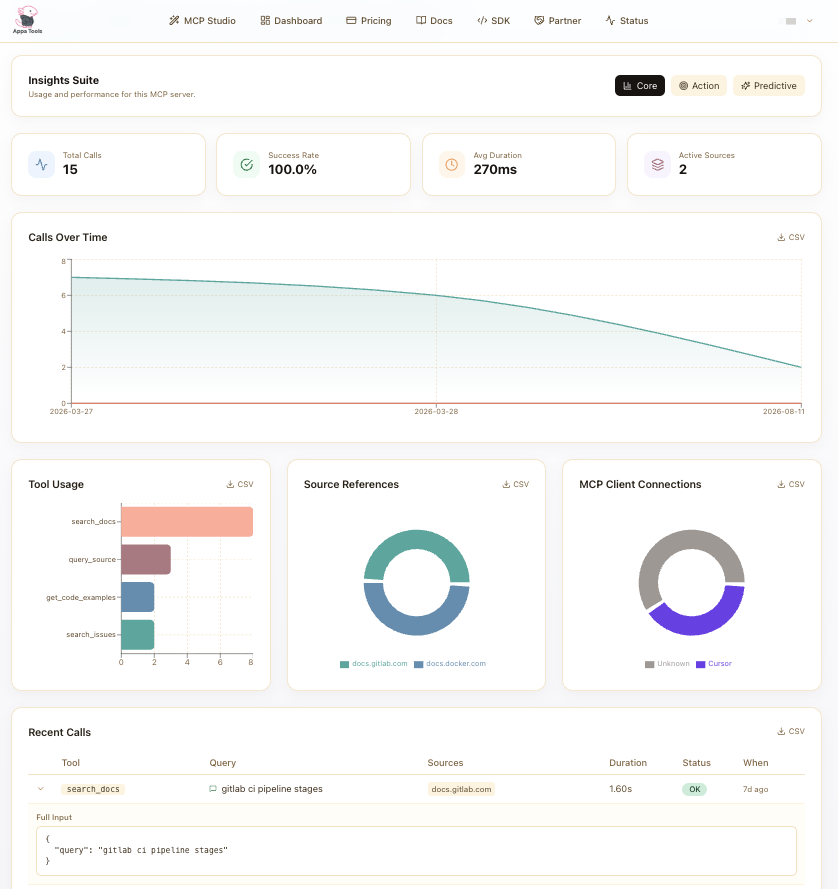
Keep a short retrieval test beside the application: the PayPal customer parameter, the current guidance for a nullable SQLAlchemy column, the path operation shape for the installed FastAPI version, and a cross-source first-pass outline from the mermaid, with citations.
Where to go next
The full-stack context tutorial is the procedural reference, source configuration covers each source type, and the connection guide has the client-by-client setup.